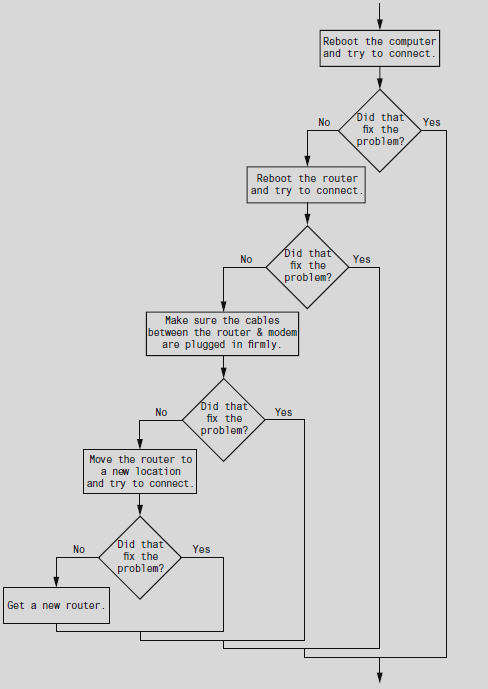
Here is a Python Script
If then try…
….
else try ..,
From this script flow & flowchart you can learn to debug a non working connection
EASY READ EVEN FOR NON PYTHON PROGRAMMERS
SCRIPT HERE // FLOWCHART FOLLOWS
Flowchart
Just another WordPress site
Here is a Python Script
If then try…
….
else try ..,
From this script flow & flowchart you can learn to debug a non working connection
EASY READ EVEN FOR NON PYTHON PROGRAMMERS
SCRIPT HERE // FLOWCHART FOLLOWS
Flowchart
Making Linux GUI programs using Linux Shell Scripting
=======================
Usually Linux Shell Scripts make programs run in the CLI/Shell/Terminal, but less people know that using some commands like kdialog you can create GUI interfaces for Linux Desktops [Not Linux Servers] rather than run in the Terminal as normally do …
If you want learn more continue reading …
Coming Soon !!!
Run py, sh, php, pl program files from a single shell script
================
Tested in Cent OS 7.5 Linux
Level Beginner – Internediate
Free Download ALL Script Files for this Post
Here is the console from my Linux SSH Terminal (PuTTY Win 10):
Please view my console below – and download zip files from my AWS S3 cloud storage link just above
Using username "root".
Authenticating with public key "rsa-key-20170603" from agent
Last login: Thu Aug 16 20:40:43 2018 from pc7
[root@server1 ~]# whereis php
php: /usr/bin/php /usr/lib64/php /etc/php.d /etc/php.ini /usr/share/php /usr/share/man/man1/php.1.gz
[root@server1 ~]# whereis python
python: /usr/bin/python2.7 /usr/bin/python /usr/lib/python2.7 /usr/lib64/python2.7 /etc/python /usr/include/python2.7 /usr/share/man/man1/python.1.gz
[root@server1 ~]# whereis perl
perl: /usr/bin/perl /usr/share/man/man1/perl.1.gz
[root@server1 ~]# whereis bash
bash: /usr/bin/bash /usr/share/man/man1/bash.1.gz
[root@server1 ~]#
[root@server1 ~]# mkdir blog
[root@server1 ~]# cd blog
[root@server1 blog]# vim script.sh
[root@server1 blog]# chmod u+x script.sh
[root@server1 blog]# cat script.sh
#!/usr/bin/bash
# using the case command
#
read -p "Please enter language: " lang
case $lang in
py | python | Python)
/usr/bin/python2.7 py.py;;
shell | sh)
/usr/bin/bash shell.sh;;
perl | pl)
/usr/bin/perl perl.pl;;
php)
/usr/bin/php php.php;;
*)
echo "sh, php, py or pl only, you entered "$lang ;;
esac
# whereis bash
# whereis python
# whereis perl
# whereis php
[root@server1 blog]# vim php.php
[root@server1 blog]# cat php.php
<?php
echo "From PHP !";
?>
[root@server1 blog]# vim py.py
[root@server1 blog]# cat py.py
#!/usr/bin/python2.7
print("From Python !");
[root@server1 blog]# vim shell.sh
[root@server1 blog]# cat shell.sh
#!/usr/bin/bash
print("From shell script !");
[root@server1 blog]# vim perl.pl
[root@server1 blog]# cat perl.pl
#!/usr/bin/perl
print("From Perl !");
[root@server1 blog]# ./script.sh
Please enter language: php
From PHP !
[root@server1 blog]# ./script.sh
Please enter language: py
From Python !
[root@server1 blog]# ./script.sh
Please enter language: pl
From Perl !
[root@server1 blog]# vim shell.sh
[root@server1 blog]# cat shell.sh
#!/usr/bin/bash
echo "From shell script !";
[root@server1 blog]# ./script.sh
Please enter language: sh
From shell script !
[root@server1 blog]# cat script.sh
#!/usr/bin/bash
# using the case command
#
read -p "Please enter language: " lang
case $lang in
py | python | Python)
/usr/bin/python2.7 py.py;;
shell | sh)
/usr/bin/bash shell.sh;;
perl | pl)
/usr/bin/perl perl.pl;;
php)
/usr/bin/php php.php;;
*)
echo "sh, php, py or pl only, you entered "$lang ;;
esac
# whereis bash
# whereis python
# whereis perl
# whereis php
[root@server1 blog]#